
PrintSharing is enabled per Printer Configuration. Create or modify a configuration, then assign it to the devices where you want to offer guest printing, either directly or using printer groups (recommended).
-
Go to Roger > Printer Configurations.
-
Click +Add Printer Configuration or select an existing configuration to modify.
-
Click the PrintSharing tab, and configure the following options:
-
Check Enable to activate PrintSharing for this configuration.
-
Payment Mode
-
Disabled (Default): Complimentary Printing mode. Guests print for free.
-
Enabled: Guests pay to print.
-
-
Maximum Document Length (Optional)
Set the maximum document length, in pages. Use this option to control printing costs, especially when in Complimentary Printing mode. Leave this field empty if you do not want to use a document page limit. -
Service Summary (View only)
This shows the active price list, minimum chargeable unit, and currency.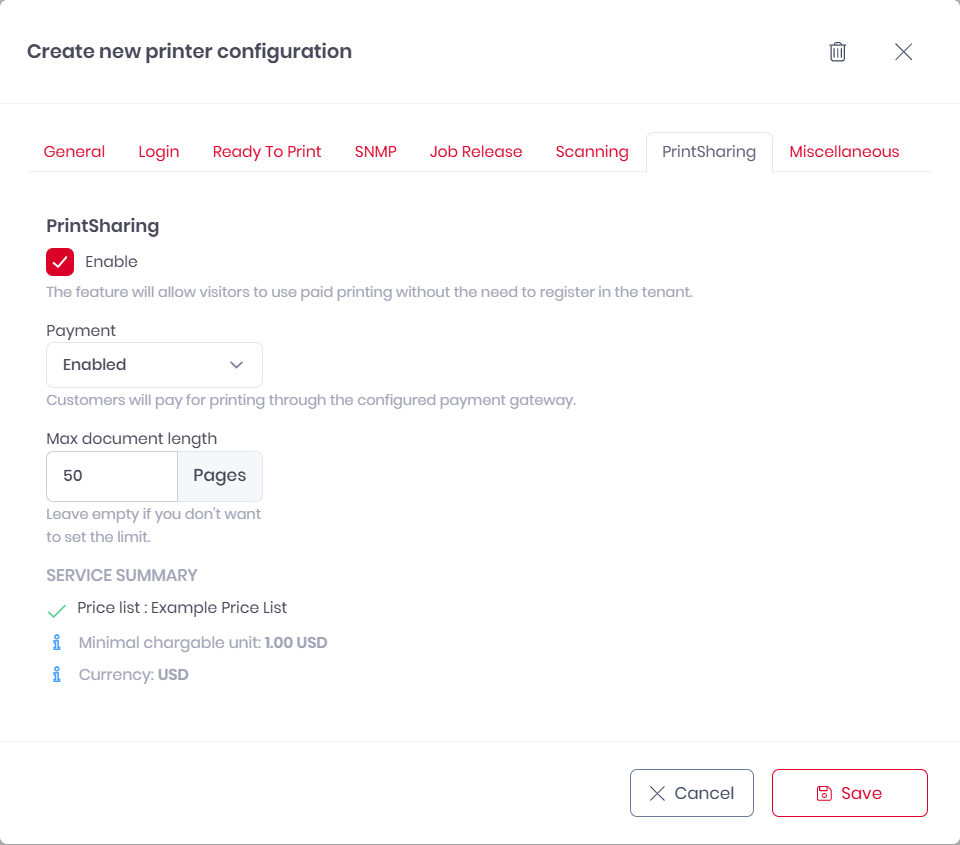
-
-
(Recommended) Select the Login tab. Under Default screen on terminals, select PrintSharing. This displays the PrintSharing QR code by default, making it easier for guests to start. Registered users can still navigate to other login methods.
-
Click Save.
More Information