To view PrintSharing usage and transaction history, go to Roger > PrintSharing.
MyQ Roger shows summary information and selected details about each transaction. For comprehensive transaction information, log in to your Stripe Dashboard:
Summary Dashboard
The dashboard shows real-time usage metrics at a glance:
-
Sessions Today: Guest sessions completed today.
-
Unfinished Today: Incomplete or abandoned sessions today.
-
Sessions This Month: Total sessions with daily average.
-
Amount This Month: Total revenue generated this month. Shows as empty if Complimentary Printing mode is used.

Payments Overview
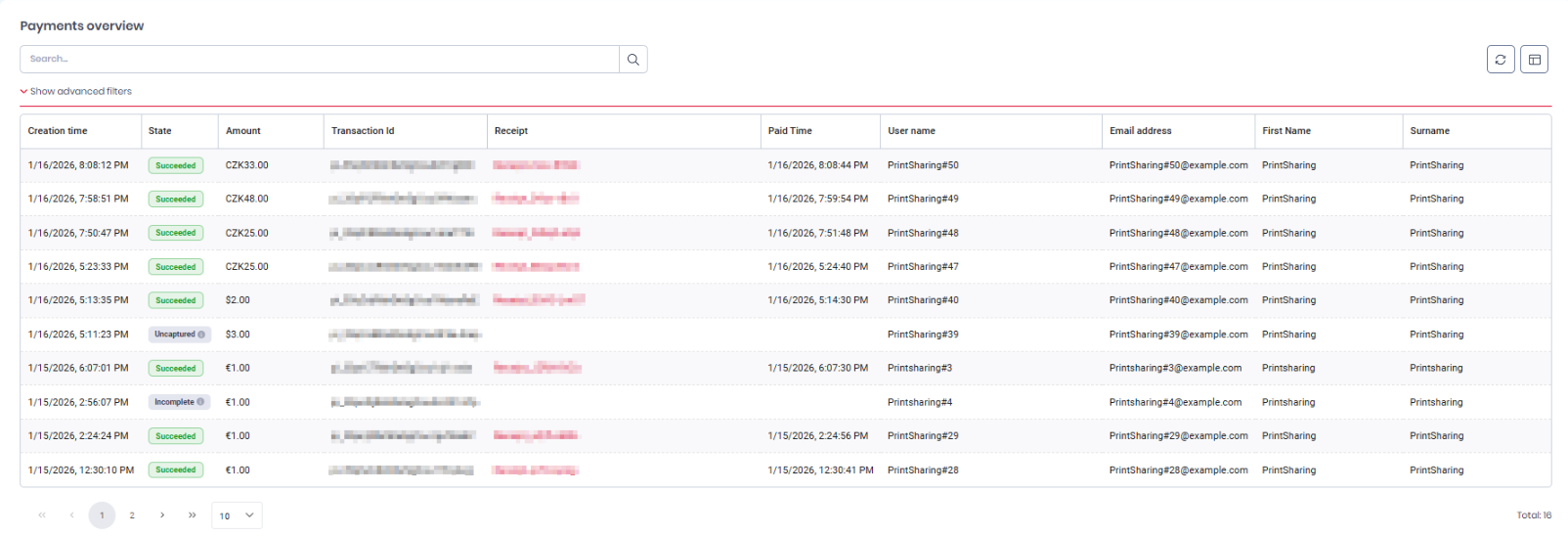
The Payments overview table displays transaction history for all PrintSharing sessions.
Finding Transactions
Use the search bar to find specific transactions by transaction ID, email address, or other fields.
Advanced filters let you narrow results by:
-
Date range (creation time)
-
Amount (currency and min/max range)
-
Transaction state (Succeeded, Failed, Pending, etc.)
Transaction Data
Each transaction shows:
-
Creation and paid time
-
Transaction ID, state and amount
-
Receipt - click the receipt to download a copy.
-
Guest user information – these fields may show system-generated guest identifiers.
Customize the table: Click the gear icon to show/hide columns and reorder them.
Example: