
Overview
MyQ Roger is a native Public Cloud SaaS. Unlike traditional on-premises print management systems, Roger is designed as a distributed system hosted primarily in Microsoft Azure, utilizing container orchestration and microservices.
The system is divided into two primary environments:
-
Server-Side (Cloud): Hosted in Azure Kubernetes Services (AKS), handling logic, databases, and messaging.
-
Client-Side (Local): Applications running on user workstations, mobile devices, and Multi-Functional Printers (MFPs) that communicate securely with the cloud.
Server-Side Architecture (Cloud)
The core of MyQ Roger resides in the Microsoft Azure Cloud. The infrastructure is designed for high availability, security, and scalability using Kubernetes.
Core Components
-
Azure Kubernetes Service (AKS): The application logic runs within Docker containers managed by Kubernetes.
-
Roger Server (ASP.NET Core): The main backend application handling business logic, API requests, print jobs, and user and printer management.
-
Event Bus Server: Handles asynchronous messaging and real-time communication between the server and clients.
-
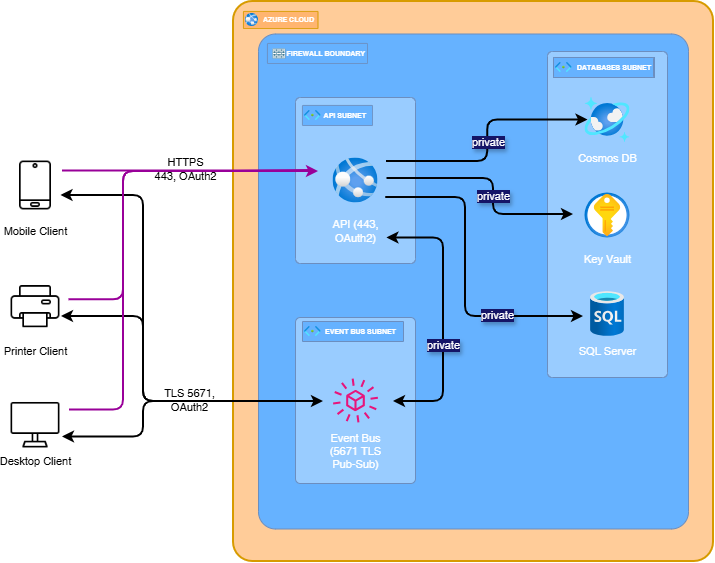
Load Balancer & Ingress: Traffic enters the cluster via an Azure Load Balancer, routing HTTPS traffic to the appropriate services ({region}.roger.myq.cloud:443, and {region}.amqp.myq.cloud:5671).
Data Persistence
MyQ Roger utilizes specific Azure data services to ensure data integrity and security:
-
SQL Database: Stores structured data (users, printers, job accounting, etc.).
-
Cosmos DB: A non-SQL repository for raw, deeply structured job telemetry, preserving data before summarizing it on the reports page and exported reports.
-
KeyVault: Securely manages secrets, keys, and certificates.
Client-Side Components
Because the server is in the cloud, the Client-Side components play a crucial role in bridging the local network (where the printers are) with the cloud infrastructure.
-
Roger Desktop Client (.NET Core):
-
Platform: Windows, macOS
-
Role: Acts as a local connector. It is not just a user interface; it handles the job accounting and release process via Roger Server.
-
Job Management & Spooling:
-
Client Spooling (Local): Keeps the print job data on the user's device to minimize bandwidth usage, sending only the metadata to the cloud. The job is released directly from the client to the printer. Printers are discovered using SNMP communication, and jobs can be released using IPPS or RAW protocols configured in the Roger Server. The printer and MyQ Roger Client (MRC) should be on the same network.
-
Cloud Spooling: Optionally uploads the full print job to Cloud Storage (OneDrive, Google Drive, MyQ Cloud), allowing users to release jobs on any network or device.
-
-
Resilience & Monitoring:
-
Fallback Printing: Ensures printing continuity by automatically switching routing methods if a connection to the Roger Server is temporarily disrupted.
-
Local Print Monitoring (LPM): Tracks and accounts for local printing activities (all the jobs sent to locally connected USB printers or direct TCP/IP queues).
-
-
Communication: Connects to the Roger Server via API/REST or websockets, and maintains a persistent connection to Event Bus (AMQP via TLS port 5671) for real-time signaling.
-
-
Roger Mobile App (Flutter):
-
Platform: iOS, Android, Chromebook.
-
Role: Acts as a personal digital workplace assistant, bridging cloud storage with physical devices.
-
Cloud Integration:
-
Connecting & Browsing Clouds: Authenticates directly with third-party cloud storage (OneDrive, Google Drive, SharePoint, Dropbox, and Box) allowing users to browse folders and preview files.
-
-
Digital Workflows:
-
Workflow Management: Empowers users to fully control their document processes. Beyond simply triggering complex scan workflows, users can create new personal workflows from scratch or manage and modify existing ones directly within the app interface.
-
Mobile Scanning: Uses the device camera to scan documents, apply edge detection/correction, and share or upload to the device, connected cloud destinations, or email.
-
-
Printer Interaction:
-
Identification & Release: "Discovers" printers without network scanning, using physical proximity (Bluetooth/NFC), or scanning a QR Code on the device panel to authenticate and release jobs securely.
-
-
-
Roger MFP/Terminal:
-
Role: Acts as a secure cloud kiosk directly on the printer panel, managing user authentication and executing serverless print and scan workflows.
-
Platforms & Technology:
-
Kyocera: HyPAS (Java-based), runs as a native system application directly on the device firmware.
-
HP: Android (HP Workpath), runs as a modern Android app installed via the HP Command Center.
-
Ricoh: Android (Smart Operation Panel), runs as a native Android application on the Ricoh SmartSDK.
-
-
Communication:
-
Protocol: Uses strictly encrypted HTTPS (TLS 1.2/1.3) for all communication.
-
Direct Access: The terminal communicates directly with the {region}.roger.myq.cloud.
-
-
-
Roger Web Client (Angular):
-
Role: Serves as the unified access point for tenant administration and user self-service.
-
Capabilities:
-
Admin Console: Provides a centralized interface for managing the entire tenant environment, including user management and synchronization (Azure AD), printer management, policy definitions, and quota management.
-
User Portal: Offers end-users a personal dashboard view of their job history and the option to manage their personal profile.
-
-
Communication:
-
Access Point: Users access the client via a secure URL.
-
Protocol: Communicates exclusively via HTTPS (TLS 1.2/1.3), making REST API calls to the Roger Server backend.
-
-
Network & Security Architecture
MyQ Roger employs a "Secure by Design" network architecture, utilizing segmented subnets and encrypted protocols.
Network Segmentation
The Azure environment is segmented into distinct security zones:
-
API Subnet: Public facing (via Load Balancer) hosts the API and OAuth2 services. This is the entry point for all Mobile and Printer clients via HTTPS (Port 443).
-
Event Bus Subnet: Handles message queuing. Accessible by Desktop Clients via secure TLS (Port 5671).
-
Databases Subnet: A strictly private subnet containing Cosmos DB, Key Vault, and SQL Server. These are not exposed to the public internet and are only accessible via the API Subnet.
Communication Protocols
-
HTTPS (Port 443): Used for all REST API calls from Mobile Apps, Web Clients, and MFPs.
-
AMQP (Port 5671): Secure messaging protocol used by the Desktop Client to communicate with the Event Bus.
-
SNMP & IPPS: Used locally by the Desktop Client to discover and communicate with physical printers.
Global & Regional Discovery
To support a global user base, MyQ Roger implements a regional discovery mechanism.
-
Region Discovery Server: When a client initializes, it contacts the Global Server.
-
Regional Routing: The Global Server routes the client to the appropriate "Server-Side Cluster" (Region) based on the tenant's location (e.g., EU, EU2, US).
Executable & Technology Summary
|
Component |
Technology / Framework |
Platform / OS |
Primary Protocols (Outbound) |
|
Roger Server |
ASP.NET Core |
Azure Kubernetes Service (Linux Containers) |
HTTPS (443), SQL, Internal Cluster |
|
Event Bus Server |
Message Queue (AMQP) |
Azure Kubernetes Service |
AMQP (5671) |
|
Desktop Client |
.NET Core |
Windows, macOS |
HTTPS, AMQP, SNMP, Raw Port 9100, LPR 515 |
|
Mobile App |
Flutter |
iOS, Android, Chromebook |
HTTPS, OAuth (Clouds), Bluetooth/NFC |
|
Web Client |
Angular (SPA) |
Web Browser |
HTTPS (TLS 1.2/1.3) |
|
MFP Terminal |
Kyocera: HyPAS (Java)HP/Ricoh: Android |
Embedded Device Firmware |
HTTPS (TLS 1.2/1.3) |