
Once MyQ Roger Client (MRC) is installed, the application starts running in the background as an agent and a service .
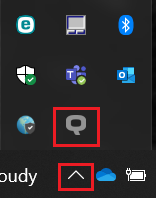
Click on the Q the icon in the Windows system tray to open the application.
After the installation, if tenant was not pre-configured during the installation, the app is not connected to any tenant. With the first user authentication, it connects to the tenant and then keeps the connection even when the user logs off their Windows account.