
In the Scanning Tab you can configure the Scan to email settings.
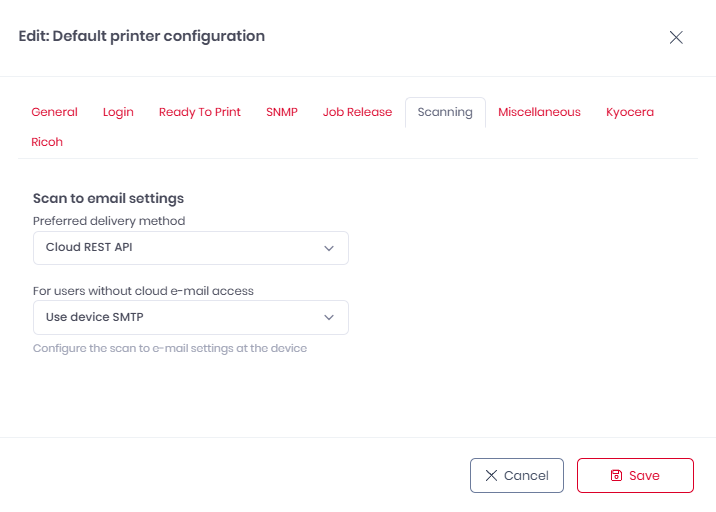
Select a Preferred delivery method and a secondary method For users without cloud e-mail access.
-
Preferred delivery method
-
Cloud REST API
-
Device SMTP
-
-
For users without cloud email access (if Cloud REST API is selected)
-
Use device SMTP
-
Hide the scan to e-mail workflows
-
If the preferred delivery method is set to Cloud REST API and for users without cloud email access Hide the scan to e-mail workflows is selected, and a user does not have OneDrive connected, they will not see any Scan to email workflow on printers with this configuration.
To use Cloud REST API the user must have their OneDrive connected in their Settings. For more information, see My Settings.
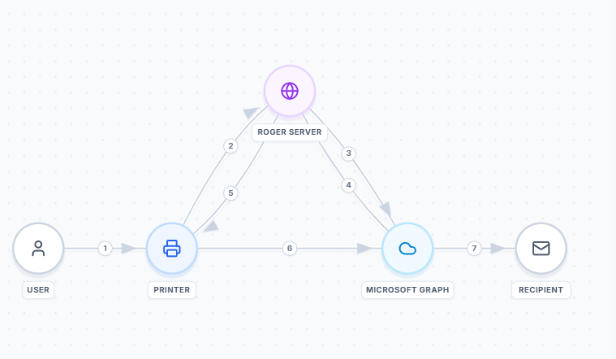
Scan to email is performed according to the following protocol:
-
User logs in on device.
-
Device requests an access token from Roger.
-
Roger requests a token from Graph API.
-
Graph API returns a token to Roger.
-
Roger returns the token to the device.
-
Device sends an email directly to Graph API.
-
Graph API delivers email to recipient.