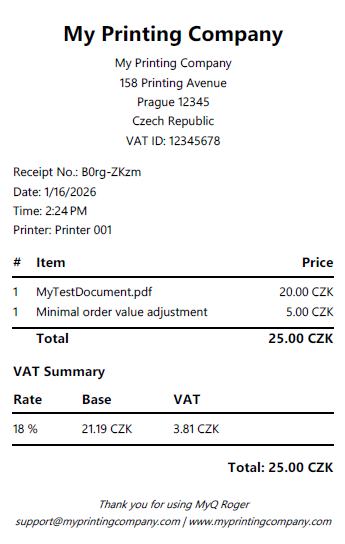
After each transaction a receipt is generated by the Roger Server and sent to the guest’s email in PDF format. A transaction is a single payment that may include one or more print jobs.
Receipt Generation
-
Receipts are generated only after payment is successfully captured (post-printing).
-
Billing address auto-populated from Stripe Connect onboarding (editable by admin).
Receipt Content
-
Tenant billing/business address (from Stripe onboarding or manual entry)
-
Print job details (pages, copies, settings)
-
Itemized pricing with currency symbol for each line item
-
Minimal Order Value Adjustment (if applicable) - as separate line item.
-
Total amount charged
-
Tax summary
-
Transaction ID
-
Local date and time of transaction
-
Receipt is generated in the tenant's default language
Sample Receipt