
Enabling User Synchronization allows you to import and manage users from Azure Entra ID into MyQ Roger. Before the release of Roger 2.20 and Integrations, it was configured on the Administration > User Synchronization page. It is now a section of Integrations.
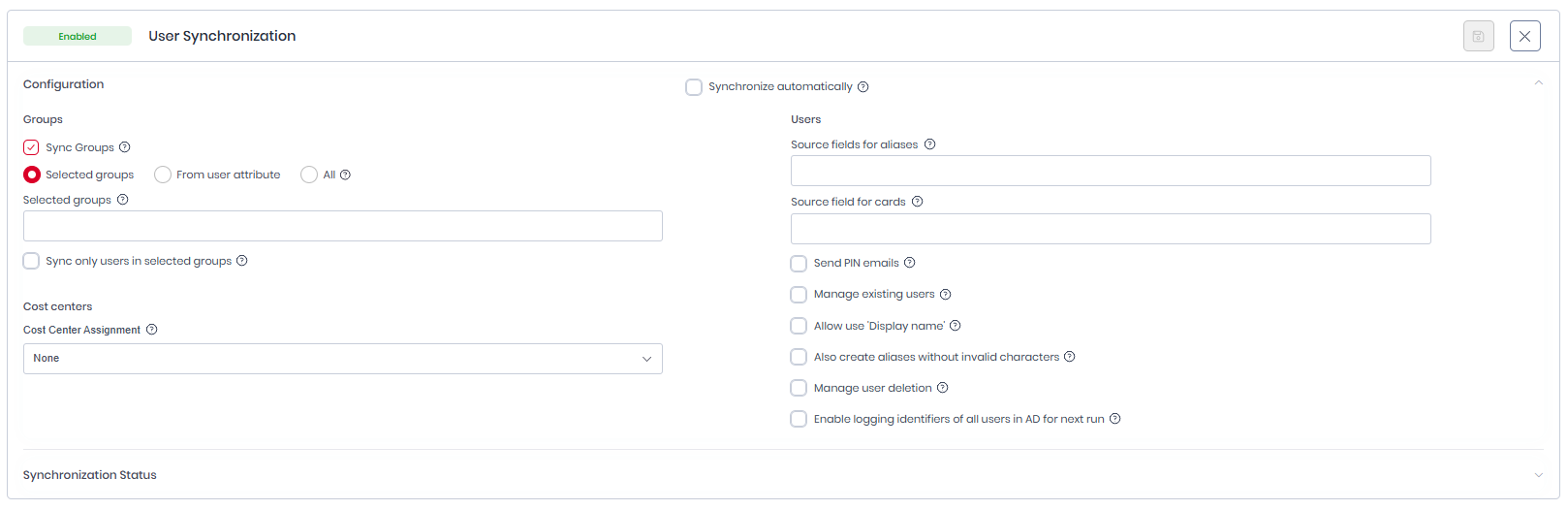
Synchronize automatically
-
Enabling this setting will trigger sync once a day automatically - the first sync will be performed 24 hours after this option is selected.
Groups
-
Sync Groups: enable to synchronize groups.
-
Selection Mode:
-
Selected groups: Only the groups with entered Azure IDs in a comma separated list are synchronized.
-
Sync only users in selected groups: Enable if you want to synchronize only users from the selected groups. Otherwise, all users are synchronized regardless their group membership.
-
-
From user attribute: Create groups based on user attribute.
-
All: Synchronizes all groups in AD. If 'All' users is selected, the whole AD is synchronized including users that are not members of any groups. This option is disabled by default. To enable it, contact your MyQ Account Manager.
-
Cost Centers
Users can be assigned to Cost Centers that are created automatically based on Microsoft group structure.
-
Cost Center Assignment
-
None: No Cost Centers are assigned.
-
From root group: A single root group ID can be entered. Cost centers will be created from the immediate child groups, and users within those groups will be assigned to the corresponding cost centers. This option is only available if Sync Groups is enabled.
-
Cost centers by attribute: cost centers are created according to Azure attribute values.
-
Users
-
Source fields for Aliases: Combines specified fields into a single alias by surrounding each field with
%; multiple alias formats can be defined using semicolons, e.g.%givenName%.%surName%;%surName%-%givenName%. -
Source fields for cards: Assigns the user a card containing the value from the specified AD field.
-
Send PIN emails: Newly synchronized users receive a registration email with their PIN.
-
Manage existing users: Synchronizes and updates existing users found in the active directory. Users are matched by email address. The admin user is ignored.
-
Allow use of ‘Display name’: First and last names are mandatory fields in Roger. Some Azure accounts (primarily those of guests) may use Displayname instead, however, this can cause issues such as the synchronization of technical accounts that cannot otherwise be distinguished.
-
Also create aliases without invalid characters: Invalid characters (such as
" [ ] : ; | = + * ? < > / \ , .and spaces) are automatically removed when creating an alias, e.g., John_Doe → JohnDoe. -
Manage user deletion: When enabled, Roger remembers the users before synchronization and compares them with the users after synchronization. It deletes accounts it does not retrieve from the remote system. Microsoft provides information about accounts that should be deleted for a limited time. Only turn it on if the sync has not run for an extended period of time or if you have changed the sync settings and need to delete previously synced accounts as well.
-
Enable logging identifiers of all users in AD for next run: Enables verification of users in Microsoft without logging sensitive data; results are recorded in the Audit Logs section.
Synchronization Status
You can open the Synchronization Status panel to view detailed information on the current state of your user synchronization cycle and users synced.

Entra ID Application
-
Name: MyQ Roger Entra ID Connector
-
Split Integration ID: 015bb5b5-3b39-4321-b37f-17e7a72d4f38
-
MyQ Roger Integration ID: custom created app
Required Scopes
Unlike the other Microsoft integration features, User Synchronization does not request delegated OAuth scopes. It uses application permissions (app roles) granted on the custom app registration in Microsoft Entra ID, which the admin must consent to during setup. The typical permissions required are:
-
User.Read.All -
Group.Read.All -
Directory.Read.All